Vibe Coding vs. Agentic Engineering: How We Built a Month-Long Project in 13 Human Hours
Want production-ready code in less time? We turned a month-long project into a 13-hour reality, spending 86% of the time on Agentic Engineering's invisible rigor. Master the vibes, but double down on the engineering

Is "Vibe Coding" the future of software, or just a flashy entry point? In a recent interview with Sequoia Capital, AI visionary Andrej Karpathy drew a sharp distinction between the two.
"Vibe Coding is about raising the floor for everyone. Agentic engineering is about preserving the bar of what existed before in professional software."
While vibe coding is excellent for rapid prototyping, building a production-ready product requires rigorous engineering. By combining both, we unlocked a massive productivity boost, completing a project that would traditionally take a full dev team a month in less than 40 hours.
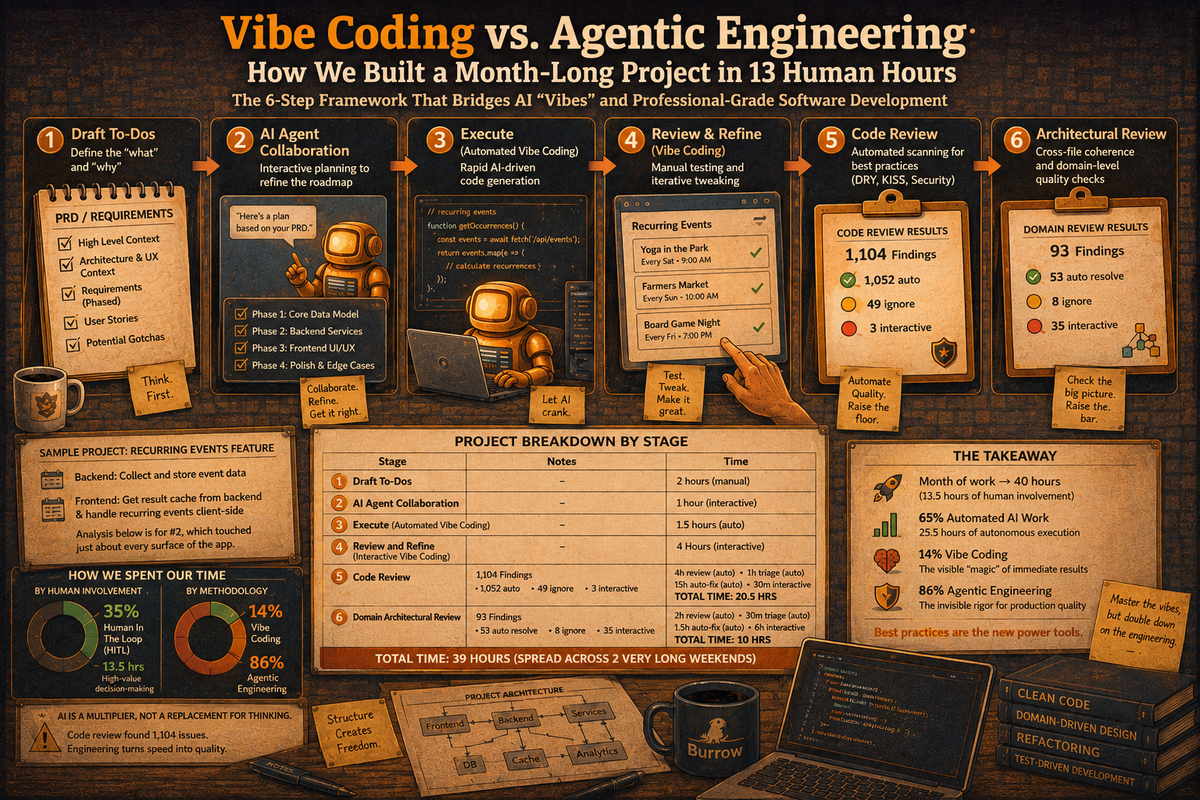
Here is the 6-step framework we use to bridge the gap between AI "vibes" and professional-grade software development.
The 6-Step Development Process
Our methodology balances automated AI execution with structured human oversight:
- Draft To-Dos: Define the "what" and "why" with manual precision.
- AI Agent Collaboration: Interactive planning to refine the technical roadmap.
- Execute (Automated Vibe Coding): Rapid AI-driven code generation.
- Review & Refine (Vibe Coding): Manual testing and iterative "vibe" tweaking.
- Code Review: Automated scanning for best practices (DRY, KISS, Security).
- Architectural Review: Cross-file coherence and domain-level quality checks.
Sample Project
We applied this to a complex recurring events feature for Burrow. What would have been a month of traditional manual labor for a full team was compressed into a high-intensity weekend sprint. The results speak for themselves:
- Backend work to collect and store the event data
- Frontend work to collect the result cache from the backend and handle recurring events client-side.
This analysis is only for #2, which touched just about every surface of the app.
Below is a breakdown of what was involved in each of the 6 stages (which will make more sense as you read the details that follow). For reference, I define these terms.
- Vibe Coding - real-time interaction with an agent, sending prompts and seeing the results, then tweaking what I see. The surface layer that delivers immediate satisfaction.
- Agentic Engineering - everything else. The planning and refinement of the plan before pulling the trigger, and then all the code and project analysis to ensure everything under the hood supports what sits on top.
Even though we used Opus 4.7 for all the vibe coding, the code review found 1,104 issues that appeared NOT to follow coding best practices. The code review found 93 issues.
Total time: 39 hours (spread across 2 very long weekends)
There are a couple of ways to look at this data. First, distribution by human-involved versus completely autonomous AI.
- 35% Human In The Loop (HITL): 13.5 hours of high-value decision-making.
- 65% Automated AI Work: 25.5 hours of autonomous coding and reviewing.
A second approach, more relevant for this post, is Vibe Coding versus Agentic Engineering.
- 14% Vibe Coding: The visible "magic" of immediate results.
- 86% Agentic Engineering: The invisible rigor that ensures production quality.
That new hotness requires a lot of behind-the-scenes work... just like traditional development, but faster.
Why Engineering Still Matters
The efficiency gains are massive, but the "Garbage In, Garbage Out" principle remains. AI is a multiplier, not a replacement for thinking. Even with advanced models like Opus, our code review phase flagged over 1,100 issues. Agentic engineering ensures that rapid speed doesn't lead to a "Spaghetti Code Limit."
Conclusion: Best Practices are the New Power Tools
Traditional development isn't dead; it just has better tools. By dedicating 86% of the effort to agentic engineering, we turned a month-long, full-team project into a 40-hour reality (13.5 hours of human involvement). For those looking to scale their output without sacrificing quality, the message is clear: master the vibes, but double down on the engineering.
APPENDIX: How the sausage is made
For anyone who is interested, below are the details of the process we use.
Draft To-Do’s
AI development is extraordinarily powerful ... but for it to lead to good results, you have to understand what you want. I think of it like a genie that can grant any wish, but if you ask to be taller, it might make you ¼” taller… or it might make you 20' tall. If you wish to be the smartest person in the world, it might just make everyone else dumber than you. You still have to think.
I use ClickUp to keep track of bugs, enhancements, and other ideas. It allows me to capture tasks (and potential tasks), prioritize them, and flesh out my ideas. Once I'm done with my description, I'll often have an engineering team member (aka Christian) review it to make sure it's pretty solid.
For big product features, the description can get quite lengthy and often break into several sections.
- High Level Context - an explanation of what I'm trying to do and why
- Architecture and UX context - general principles of what I expect and a highlight of potential gotchas to help set the stage
- Architecture and UX requirements - these get into more detailed requirements, often broken out into phases that can be implemented, tested, and used to refine upcoming phases. When I say details, this is more at the level of a user story, where I allow the AI flexibility in the specifics of how to implement the architecture and even the UX.
AI Agent Collaboration
Next, I share the rather lengthy description with my AI Agent in plan mode, frequently with a prompt along the lines of ...
OK, we're going to work on a pretty big project. I would like to share my initial thoughts with you, discuss and refine the details, and develop a plan for implementation.
That collaboration typically results in a collection of tasks or a new PRD that is almost always phased. This is another good time to have an engineer review the output.
Execute (Vibe Coding)
The actual execution typically takes the least amount of time - by far!
Even significant new features or refactors tend to be completed in under 2 hours, during which time, I'm doing chores around the house or getting something to eat. This is where a lot of the planning pays off.
Review and Refine (Vibe Coding)
After each phase, I manually test the results and make refinements, ensuring I update the PRD as I go. This is pretty intensive work, and my findings are much less things the agent got wrong and much more likely things I didn't think about during the preparation.
Over a 2-3-phase implementation, this might take anywhere from 2 to 6 hours.
Code Review
When things seem to be in pretty good shape, it's time for a code review to ensure the quality and avoid the Spaghetti Code Limit. We use a code review skill to enforce best practices, following several steps:
- Code Review Skill
- This identifies all files modified since the last review, scans them for best practices, and logs all findings in a results file. The scan includes:
- DRY/SSOT/Magic-Numbers
- Interfaces+Cohesion checks
- Logic+Consistency
- Comments+PRDs check
- Error Handling
- KISS / YAGNI
- Security Review
- Each finding includes a description, relevant file name and line numbers, the category, severity, and a proposed resolution. No code is modified yet.
- For bigger updates, this can take up to 4 hours for a single agent, but spinning up multiple agents - each with ownership for a file - can dramatically reduce that time. It's a good time to catch up on whatever show you're binge-watching.
- This identifies all files modified since the last review, scans them for best practices, and logs all findings in a results file. The scan includes:
- Code Triage Skill
- This skill has its own guidelines for deciding whether a finding should be auto-resolved, ignored, or flagged for an interactive discussion with me when decisions are needed.
- The agent runs with fresh context to avoid bias and offer a fresh perspective. It can even use a different LLM as a peer review.
- This typically takes between 30-90 minutes. Go outside and take a walk.
- Execute auto-resolve
- For files that have been through the review process before, typically 80-90% can be auto-resolved.
- For modest initiatives, this might take about 4 hours. The case study for this post took a record 15 hours! Run these overnight while you sleep.
- Interactive resolution
- This is the most painful part, which will make your head hurt... incrementally going through each finding and making decisions about what are typically very nuanced and technical/product questions.
- For a big update where the original files were already reviewed before modification, this might take 4-6 hours of focused attention. Almost all of that time is me thinking and asking questions with the agent quickly addressing any decisions that are made. The case study for this project was an anomaly that took only 30 minutes, indicating that many of the triage rules I have in place were very effective for the types of issues found, enabling them to be flagged for auto-resolve.
Domain Architectural Review
The code review ensures the written code is robust at a file level. However, that doesn't necessarily account for the cross-file coherence and quality. For that, we follow the code review with a domain architectural review driven by the PRDs.
This review starts with the PRDs to understand the features, then clusters files into defined domains (listed below). The review analyzes these clusters collectively and then examines the boundaries between them. Findings are then triaged and addressed.
What's more, the domains are not static. The pre-flight checklist first reviews the current project and redefines the domain and associated files each run, so that as the project changes, so do the logical domain definitions.
- Data pipeline
- Discover Orchestration
- Map and Geolocation
- Navigation and Routing
- Server and API
- Profile and Favorites
- Cross Platform Patterns (web versus native app)
- FTUX and Onboarding
- Analytics
- Auth and Accounts
- Bookmarks and Collections
- Hook Utilities
- Shared UI and App Config
The domain architectural review skill closely mirrors the Code Review skill's sequence.
- Domain Architectural Review Skill
- Review and make sure the PRDs are up to date. This is the roadmap for how the review will take place.
- Update the documentation associated with the skill to define the "shape" of the project.
- Update the required approach, given the project's shape and the associated files for the major categories/features.
- Review the files and log findings to a results file
- Expect 1-3 hours for the review.
- Domain Architectural Triage Skill
- Similar to the Code Triage Skill, a separate agent with a fresh context reviews, comments, and categorizes the findings.
- Guidelines help direct the triage skill on what can be classified as auto, ignore, or interactive.
- Usually <1hr.
- Execute auto-resolve
- Auto resolve behaves the same as the code review process and, for architecture, typically takes 1-3 hours.
- Interactive Resolution
- The dreaded interactive process that makes your head hurt is very similar to the code review interactive process. Expect another 4-6 hours... if you're lucky.